
Installation tools
Use one of the tools described below or follow the instructions to manually extract the mod files for your platform.
Unity Mod Manager is NOT supported
Please consult the installation overview pagefor more information.
Owlcat Template mod installer
|
Windows 7, 8, 10, 11 |
Linux Steam/Proton based installations |
This is our own minimalist offline installer. It simply puts the mod files in all the right places. No internet connection is required.
We uploaded this tool to Nexus Mods after receiving requests from users who got tired of manual installation. Its main purpose is to correctly install mods* based on the Owlcat Mod Template, since they cannot be installed with Unity Mod Manager.
* such as Great Radiance or Homebrew ArchetypesTo quickly install or upgrade existing mods, select or drag the mod archive into the program window.
Localization support
Localizations for this mod can be installed the same way (just drag and drop the .zip files).
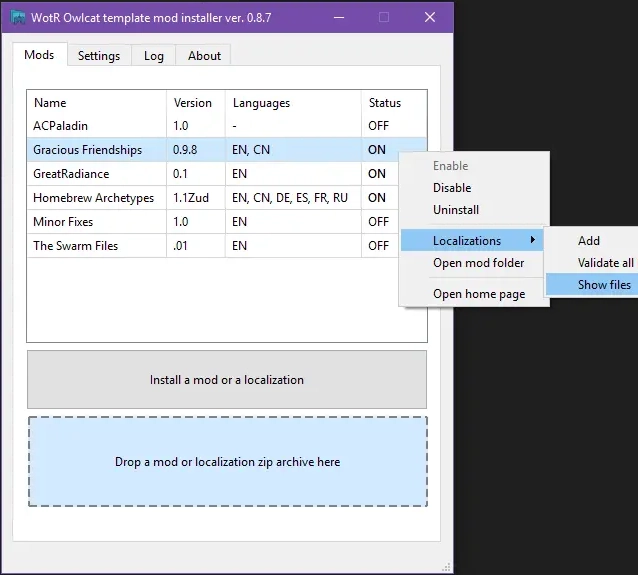
Here’s what the interface looks like:
Tested on
- x64 versions of Windows 7, 8, 10, and 11.
- Steam/Proton-based Linux installations were tested on Ubuntu 22.04 and Linux Mint.
ModFinder
Windows
This advanced tool is based on Unity Mod Manager and allows users to browse and install mods hosted on Nexus Mods and GitHub. An internet connection is required.
It also supports installing mods based on the Owlcat Mod Template.
If you are already using ModFinder for the English version of the game, you don't need another installer — the latest version of ModFinder supports our mod. Simply drag and drop the .zip archive into the app window.
Localization support
If your target language is not English, you will need to manually extract the localization files for this mod to the correct folder.
Here’s what the interface looks like:

Visit the ModFinder page for more information.