
Installation overview
Mods for Unity games are usually written in C# and installed using Unity Mod Manager.
However, since this mod is based on the Owlcat Mod Template, it CANNOT be installed with UMM.
Unity Mod Manager is NOT supported
Use one of the available installation tools or follow the instructions to manually extract the mod files for your platform.
Manual installation vs tools
The manual installation process consists of placing the mod files in the correct folder and enabling the mod by adding its name to a specific JSON configuration file. We wrote detailed instructions for each platform to make the process as clear as possible.
There are a couple of tools that can simplify the manual installation routine.
If you play the English version of the game and already use ModFinder to find and manage WotR mods, you don't need another program to install this mod.
However, if you just need to install this mod* or its localizations, you can try our offline installer. We uploaded it to Nexus Mods after receiving requests from users tired of the manual installation process.
* or any other Owlcat Template-based mod like Great Radiance or Homebrew Archetypes
Installing localizations
Manually installing this mod's localizations is not too long of a process, and we wrote detailed instructions for this process, too.
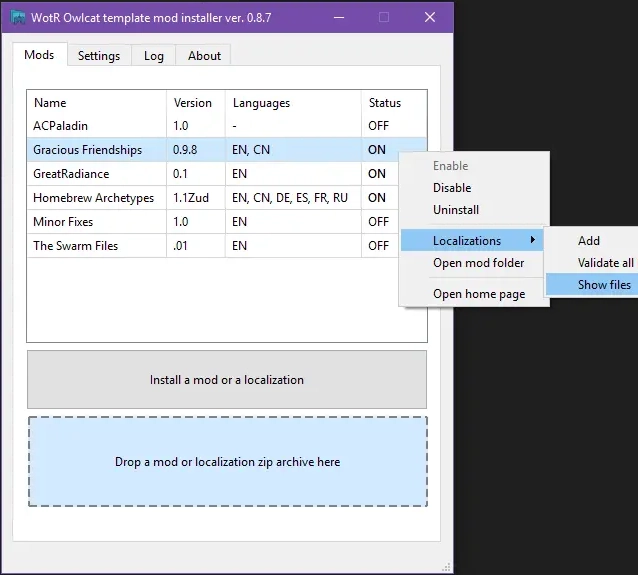
However, if you use our installer to install the mod, you can simply drag and drop a localization archive into the main window. The mod's language file will be extracted to the correct location, and the list of mods list will display the available languages:
Managing localizations
Confirming installation
No matter how you install the mod—using the tools or manually extracting the files—there is a way to ensure that it is installed and enabled.
Start WotR, and when the main menu loads, press Ctrl + M to open the Owlcat Modifications UI menu. You should see the name of the mod in the list with an "enabled" status.
The mod is enabled:

Partial installation
Will be available in the `0.9.9e` release.
Installing mid-game
You don't need to start a new game to see this mod's contents. However, since Chapter 4 and Chapter 5 have lots of added conversations and reactions, it is best to install the mod before Chapter 4.
Uninstalling mid-game
Be careful! This mod is NOT currently savegame-safe.
If you uninstall it after reading added lines, you won't be able to load your save.