
Installing Gracious Friendships on a Steam Deck
September 4, 2025 in mods, development
by
 Gvenewour
Edited by
 Ameistris

We’ve prepared detailed instructions for installing this type of mod on a Steam Deck, whether you’re using the GUI or the console.
Highlights
- Intro
- Finding the folder
- How to create a new settings file
- The Mystery of the Missing Python Dependencies
- It's alive! It's alive?
- Conclusion
Intro
Since last year, we've received some requests to find a way to install our Gracious Friendships mod on a Steam Deck. I experimented with system images such as HoloISO, and failed—successfully. But, with a newly bought Steam Deck, it became possible!
Our mod is based on the Owlcat Modification Template for WotR. This means that installation only requires placing the files in the correct directory and mentioning the mod in a specific JSON settings file. The trickier part is finding that 100% correct directory for the mod files in an OS.
So I decided to buy a Steam Deck and check what could go wrong. In the end, I could install and enable Gracious Friendships, Homebrew Archetypes, and Great Radiance (why stop at one mod?) on my device, but not without a fight.
Finding the folder
Since SteamOS uses Arch Linux as its underlying OS, most things felt familiar, but it was nice to learn hands-on (oh, the irony, more about it below) about the read-only root filesystem and the default deck username, which is the cornerstone of the whole system.
By default, Steam is usually installed in ~/.local/share/Steam/, but it's simpler to use the ~/.steam symlink (so our installer also works with it). So, after digging into the directory tree, I found the parent folder for the game saves and mod settings file right where it should be:
/home/deck/.steam/steam/steamapps/compatdata/1184370/pfx/drive_c/users/steamuser/AppData/LocalLow/Owlcat Games/Pathfinder Wrath Of The Righteous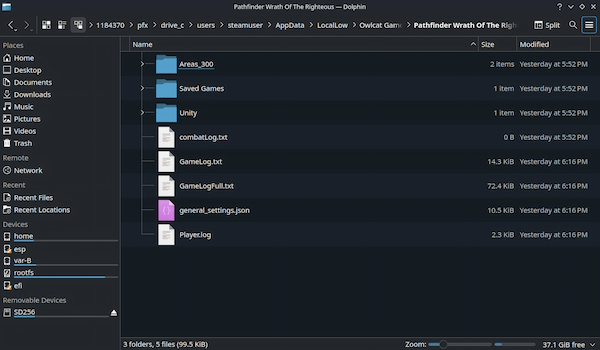
All I had to do was create a Modifications subfolder, extract the mod files, and create a simple JSON settings file with the mod's name in it. Or so I thought.
How to create a new settings file
Don't.
Seriously, don't.
Instead, transfer a valid settings file from your desktop. Or, if you'd prefer, download and save* the settings file that I personally used for this article and tested on my Steam Deck.
* Right-click on the link in your browser and select "Save link as..."
Alternatively, download the zipped settings file from the Files -> Miscellaneous section on Nexus Mods. Extract and copy the file to your Steam Deck.
Trust me, it's best not to create an empty settings file by hand and type its content manually—there are just so many things that can go wrong.
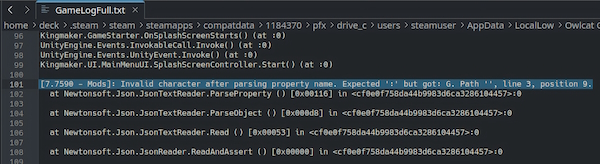
I strongly believe that all failed attempts to install our mod on a Steam Deck were due to a missing quote, a misplaced space, or a stray character in the settings file or its name.
In my case, I spent 5 (or 6?) attempts of starting the game anew and each time, I got a new creative message in the log reminding me that I am bad at predictive typing on a small screen with a screen keyboard:
Ultimately, I decided to stop wasting time and test a valid settings file from my desktop. I chose to experiment with Warpinator, since it seemed like an easy way to transfer files over LAN. Riight.
The Mystery of the Missing Python Dependencies
The desktop part for Windows, aka Winpinator, installed like a charm. But then I got an arrow in the knee.

I could have sworn that everything had worked just fine the day before, and that I had installed Space Cadet Pinball with Discover. Well... anyway, this error meant that it was time to switch to the only true way—the console. I mean Konsole:
passwd #setting the sudo password
sudo steamos-readonly disable #with great power
sudo pacman-key --init && sudo pacman-key --populate # setting up our keys
sudo pacman -Sy #upgrading the packages
sudo pacman -S warpinator # here comes the app
The package was finally installed. Now I can start it, right?

Nope. While trying to start Warpinator, got the missing dependencies case to solve:

Admittedly, this is where things went a bit (totally) wrong. I should have installed one more package (python-netifaces), and it would have been over. But from one of my previous lives, I vaguely remembered that maybe I should use pip and Python virtual environments to install the dependencies, so I did. Then, the building process failed because of the missing gcc, so I entered dev mode and restored the development headers by unminimizing the system, forgetting that rootfs space is limited on my 64Gb Steam Deck...

Well... what I want to convey is that sometimes, it's best not to become too enthusiastic. Sometimes, there is only one command you need:
sudo pacman -S python-netifacesAnd it finally worked! I swear that, if I had just used a simple USB stick and a Type-C adapter to transfer the files, I would have spent much less time.
It’s alive! It’s alive?
At last, I was able to send the mod archives and the settings file from my desktop.

I extracted them to the Modifications directory and put the settings file where it belonged:

The only task left was to start the game and check the mod status in the main menu. (I trust the logs, but visual confirmation is a must).
In order to open the mod window, I had to press Ctrl + M on the keyboard; otherwise, pressing any key on the deck would switch the game to controller mode. In a perfect world, by that point, I would have had a wireless keyboard to check the mod status in the main menu. I didn't. However, I found a Type-C adapter in one of my lockers and connected my regular desktop keyboard, only to find out that the system became unresponsive after I plugged it in.
(╯ ° □ °) ╯ (┻━┻) -
Even without the mod window, the logs said mods were recognized a-okay, but I wanted to see that very menu with my own eyes. And after I got a new keyboard, I was finally able to confirm the installation:

Conclusion
Yup, Gracious Friendships—being an Owlcat template-based mod—is totally installable on a Steam Deck. After all, it's really about placing the files in the right folder—just like on any other OS. There may be pesky obstacles along the way (and some are incredibly annoying!), but in the end, they're totally beatable.